
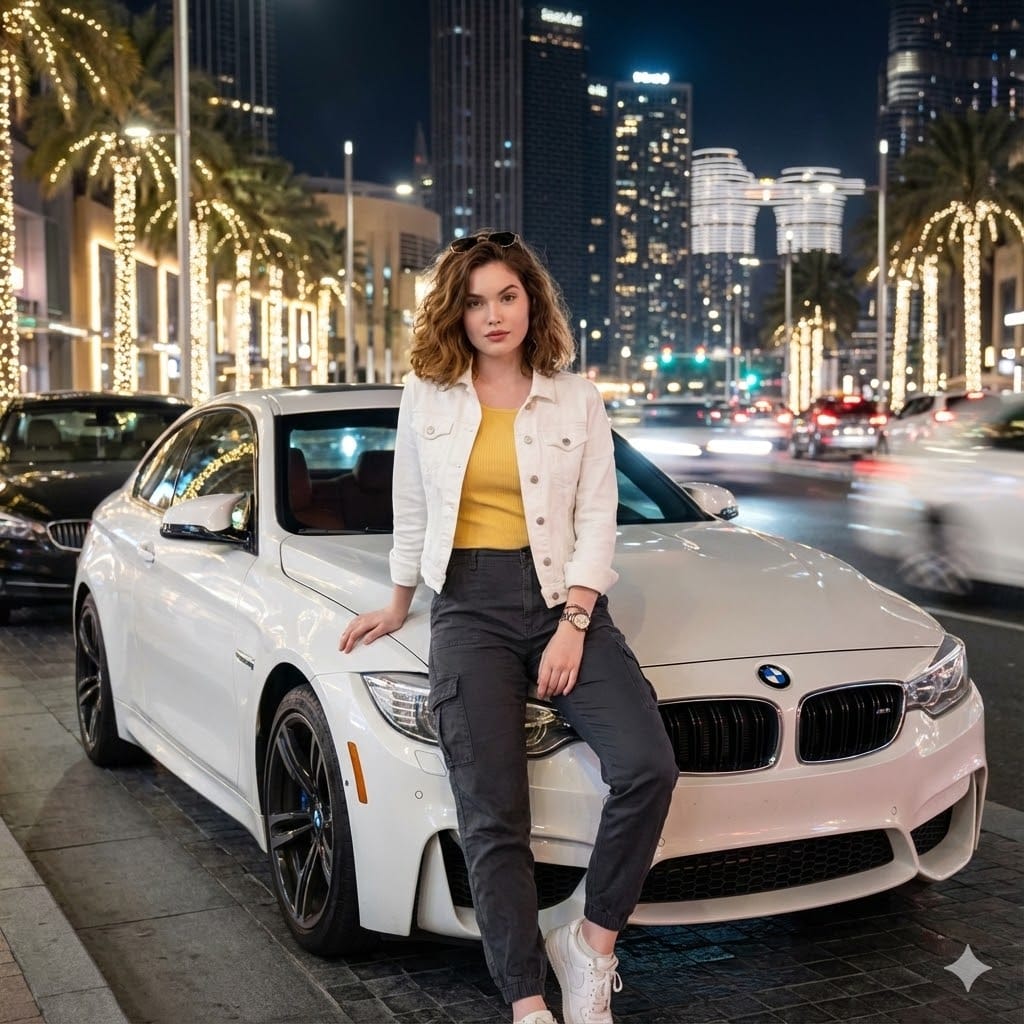
Create a blurred Car Headlights And Driving
How to blurred car headlights and driving cars
0
Times used
0
Likes
Mastering the Art of Motion: The 'Blurred Car Headlights And Driving' AI Style
There's a captivating magic to the city at night. It's a world painted not in static shapes, but in flowing rivers of light. The vibrant streaks of red and white from passing cars, the soft glow of streetlights on wet asphalt, the palpable sense of energy and movement—it’s a visual story that photographers have spent years mastering with complex long-exposure techniques. Now, with the power of generative AI, you can capture this same electrifying atmosphere in seconds. Welcome to the world of the "Create a blurred Car Headlights And Driving" style, an innovative feature within the Orno AI image editor designed to bring your most dynamic visions to life.
Whether you're a digital artist, a marketer looking for eye-catching visuals, or a creator wanting to add a cinematic flair to your projects, this AI image generation style is your key to producing stunning, professional-quality images that pulse with speed and urban energy. Forget the need for a heavy tripod and a DSLR camera; your creative text prompt is the only tool you need to command the light and motion of a bustling cityscape.
Decoding the Dynamic: What is the 'Blurred Car Headlights And Driving' Style?
At its core, the "Blurred Car Headlights And Driving" style is an AI-powered simulation of a classic photography technique: long-exposure photography. In traditional photography, this involves using a slow shutter speed to capture the movement of light sources over time, transforming individual headlights and taillights into continuous, elegant trails of light. This effect conveys an incredible sense of speed, dynamism, and the passage of time.
Orno's advanced AI model has been trained on countless images that exhibit these characteristics. It understands the physics of light, the aesthetics of motion blur, and the atmospheric elements that make these scenes so compelling. When you use this style, you are instructing the AI to generate an image with specific visual traits:
- Vibrant Light Trails: The hallmark of the style. The AI expertly renders the iconic red streaks from taillights and the bright white or yellow glow from headlights as they move across the frame.
- Sense of Speed: The background might be relatively sharp, or it too may have a degree of blur, but the primary subject—the light from the cars—is always in motion. This creates a powerful and immediate sensation of high-speed travel.
- Atmospheric Mood: These images often evoke a specific mood. Common settings include rainy nights with reflections on wet pavement, foggy cityscapes with a mysterious allure, or neon-drenched cyberpunk streets.
- Artistic Blur and Bokeh: Beyond the light trails, the AI incorporates other forms of artistic blur, such as the bokeh effect, where out-of-focus lights in the background turn into soft, pleasing orbs of color, adding depth and beauty to the scene.
By leveraging Orno's text-to-image capabilities, you can bypass the technical challenges of this photography style and focus purely on the creative direction. You become the director of your own cinematic car chase or serene nighttime drive.
Why Every Creator Needs Dynamic Car Imagery
The appeal of blurred headlights and driving scenes is universal, making it one of the most versatile and impactful styles in visual media. Its ability to instantly convey energy, modernity, and sophistication makes it a valuable asset across numerous fields. Here's why this AI-generated style is a game-changer for creators:
- Marketing and Advertising: Automotive brands can create stunning, futuristic ads without expensive photoshoots. Tech companies can use these visuals to signify speed, innovation, and forward momentum. Lifestyle brands can evoke the excitement of urban living.
- Digital Art and Concept Design: Artists can generate incredible backdrops for sci-fi or noir-themed stories. It’s perfect for creating album covers, book jackets, or concept art for video games and films that require a moody, atmospheric setting.
- Social Media Content: In a feed filled with static images, a dynamic motion blur shot immediately grabs attention. It’s a guaranteed way to increase engagement on platforms like Instagram, Pinterest, and Behance, making your content look polished and professional.
- Website and Blog Visuals: A high-quality banner image of blurred city lights can set a modern, professional tone for a tech blog, a travel site, or a creative portfolio. It's a visual shorthand for "we are dynamic and on the move."
How to Create Blurred Car Headlights And Driving Images with Orno
Orno makes generating these incredible visuals incredibly simple and intuitive. You don't need to be a prompt engineer to get started. Just follow these steps to begin creating your own high-speed masterpieces.
First, navigate to the Orno AI image editor in your browser. Our user-friendly interface is designed for a seamless creative flow. In the prompt box, you’ll begin crafting the description of the scene you envision. This is where you combine your imagination with the power of Orno's AI. To activate this specific aesthetic, you can either select a predefined style or, more powerfully, incorporate descriptive keywords directly into your text prompt.
Crafting the Perfect Prompt: Tips and Tricks
The quality of your output is directly related to the detail in your prompt. Think of yourself as a film director setting a scene. The more detail you provide the AI, the closer the result will be to your vision. Here are some pro tips:
- Specify the Environment: Don't just say "city." Describe it. Is it a "rainy Tokyo street at night, with neon signs reflecting on the wet asphalt"? Or perhaps a "winding mountain road at dusk, overlooking a sprawling city below"? The environment sets the entire mood.
- Define the Perspective: Where is the viewer? Are they watching from a "low-angle shot from the pavement" to create a dramatic sense of scale? Or is it a "drone's eye view of a massive highway interchange"? You could even try a "driver's POV (point of view) shot, looking through a rain-streaked windshield."
- Control the Colors and Light: Use adjectives to guide the AI's color palette. Words like "vibrant neon pink and blue light trails," "warm golden glow from streetlights," or "a cool, monochromatic blue color scheme" will have a huge impact. Mentioning "cinematic lighting" can also enhance the mood.
- Incorporate Keywords for Motion: While the style implies motion, reinforcing it in your prompt is key. Use phrases like "long exposure effect," "extreme motion blur," "light trails from speeding cars," and "sense of immense speed."
- Add Atmospheric Details: Small details make a big difference. Try adding "dense fog," "misty atmosphere," "steam rising from manholes," or "soft bokeh background" to give your image more depth and realism.
Example Prompts for Inspiration
Here are a few example prompts to show you how these elements come together:
Prompt 1: A hyper-realistic, long exposure photograph of a busy highway in a futuristic cyberpunk city at night. Heavy rain, wet asphalt reflecting glowing neon signs. Vivid red and blue car headlight trails create a blur of motion. Low-angle shot, cinematic, moody atmosphere, 8k resolution.
Prompt 2: Driver's point of view driving through a brightly lit tunnel, dashboard slightly in focus. The lights of the tunnel are warped into long, streaking lines of orange and white, creating an intense feeling of speed and vertigo. Motion blur effect, first-person perspective.
Prompt 3: A sleek, black sports car speeding down a coastal road at twilight. The red taillights leave a long, elegant trail behind it. In the background, the distant city lights are a soft, beautiful bokeh. Nostalgic film grain, anamorphic lens flare, professional photography.
Frequently Asked Questions (FAQ)
Do I need photography skills to use the 'Blurred Car Headlights And Driving' style?
Absolutely not! This is the beauty of Orno's AI image editor. The AI handles all the complex technical aspects of simulating long exposure, motion blur, and lighting. Your job is to be the creative director. If you can describe the scene you imagine, you can create it.
What is the best way to get long, dramatic light trails in my AI-generated images?
To emphasize the light trails, use specific keywords in your prompt. The most effective phrases are "long exposure," "light trails," "streaks of light," and "high speed." Describing a scene with lots of traffic, like a "busy highway" or a "bustling city intersection," also tells the AI to generate more sources of light and motion.
Can I create images featuring a specific type or color of car?
Yes, you can. While the cars themselves are often blurred, you can influence their appearance. Try adding "a yellow taxi cab speeding by" or "a classic red muscle car" to your prompt. The AI will incorporate the color and general shape into the motion blur, adding another layer of detail to your visual story.
How can I make my night driving images look more cinematic?
To achieve a cinematic look, use vocabulary from filmmaking. Add terms like "cinematic lighting," "anamorphic lens flare," "film grain," "widescreen aspect ratio," and specify a color grade, such as "teal and orange color palette." These instructions will guide Orno's AI to produce an image that feels like a still from a high-budget movie.
Is the 'Blurred Car Headlights And Driving' style free to use in Orno?
Orno is committed to making powerful creative tools accessible. We offer a variety of plans, including free options that allow you to start generating incredible AI images right away. For users who need higher volumes or access to our most advanced features, we offer affordable premium plans. Check our pricing page for the latest details.
Start Your Creative Journey: Generate Your Own Dynamic Driving Scenes Today
The barrier between a breathtaking creative idea and a finished, professional-quality image has never been lower. The "Create a blurred Car Headlights And Driving" style on Orno puts the power of advanced photographic techniques and generative AI right at your fingertips. You are no longer just an observer of the city's nightly dance of light; you are its choreographer.
Ready to get behind the wheel of creation? Stop dreaming of dynamic, high-energy visuals and start making them. Try Orno's AI image editor now and generate your first 'Blurred Car Headlights And Driving' masterpiece in seconds! Unleash your creativity and show the world your vision of speed and light.
Use This Prompt
Transform your images with AI
Save this prompt as its own icon for one-tap access.