
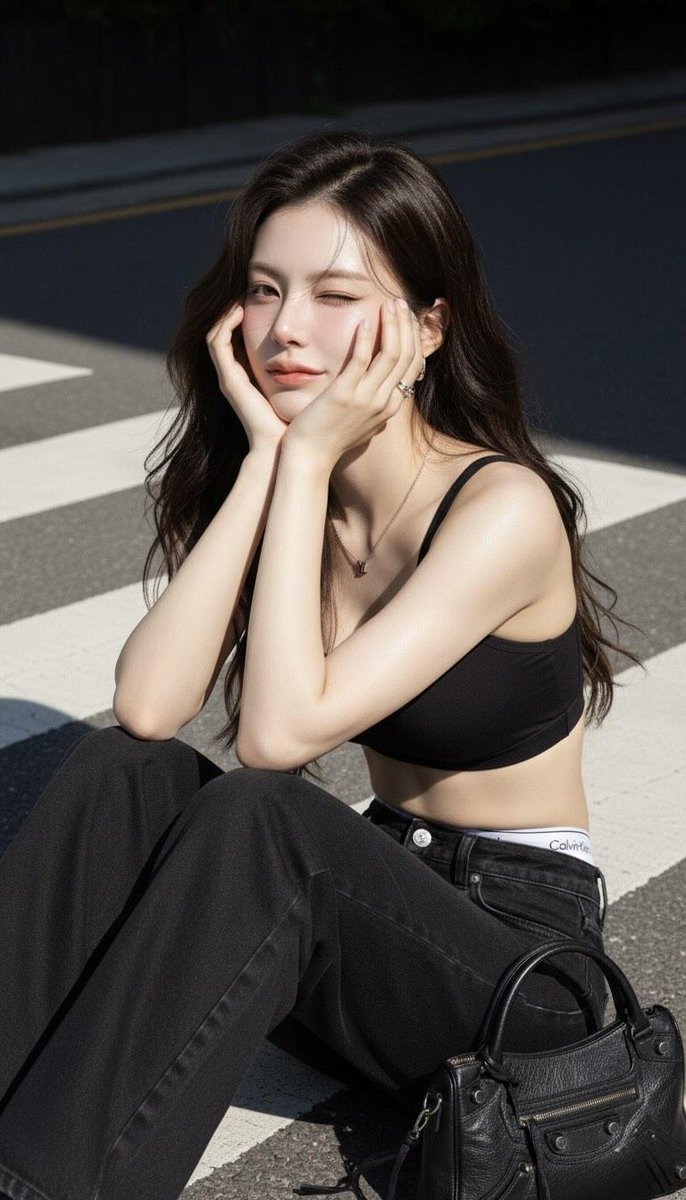
Unlocking the Ultimate Streetwear Aesthetic: The "Black Sports Bra Crop Top" AI Image Generation Style
In the fast-paced world of digital fashion and social media, a specific look can capture the collective imagination and define a trend. One such aesthetic that perfectly blends casual comfort with high-fashion edge is the "black sports bra crop top" ensemble. It's a look you’ve seen dominate Instagram feeds, TikTok lookbooks, and urban style guides. It speaks of effortless confidence, blending athleisure with a hint of 90s nostalgia. But what if you could not just admire this style, but create infinite, unique variations of it in seconds? Welcome to the power of AI image generation with Orno.
Using a detailed text-to-image prompt, you can become the director of your own digital photoshoot, generating stunning, photorealistic images that bring this iconic outfit to life. This article delves deep into the "Create a black Sports Bra Crop Top" style, breaking down every element of the prompt and showing you how to master it using the Orno AI image editor. Whether you're a content creator, a fashion designer, or simply a creative soul, prepare to unlock a new realm of visual creation.
Deconstructing the Prompt: The Anatomy of an Iconic AI-Generated Look
A great AI image starts with a great prompt. The magic of this particular style lies in its specificity. It doesn't just say "woman in a crop top"; it paints a complete picture for the AI to interpret. Let's break down each component to understand why it works so well.
The Core Element: The Black Sports Bra Crop Top 👚
The heart of the outfit is the black sports bra crop top. This phrase is a masterclass in AI prompting. By combining "sports bra" with "crop top," you instruct the AI to generate a garment that is both athletic and stylish. "Sports bra" suggests a supportive, form-fitting cut and sporty materials, while "crop top" defines the length, ensuring a modern, midriff-baring silhouette. Specifying the color "black" provides a versatile, chic, and slimming foundation that allows the other elements of the outfit to pop. Within Orno, the AI engine intelligently merges these concepts to create the perfect top that’s ready for a workout or a night out.
The Foundation: Wide-Leg Black Jeans & The Iconic Waistband 👖
The choice of bottoms is crucial for balancing the silhouette. "Wide-leg black jeans" grounds the look, offering a relaxed and trendy counterpoint to the fitted top. This detail taps into the resurgence of 90s and Y2K fashion, moving away from skinny jeans towards more fluid, comfortable shapes. But the true stroke of genius in this prompt is the detail: "showing white Calvin Klein waistband." This tiny phrase does several things:
- Adds Authenticity: It introduces a real-world brand, instantly making the generated image more believable and relatable.
- Creates Contrast: The sliver of the white waistband breaks up the monochrome of the black top and jeans, drawing the eye and adding a layer of visual interest.
- Evokes Nostalgia: It’s a direct nod to the iconic 90s fashion trend, adding a layer of cultural relevance to your AI creation.
Generating this specific detail is a testament to the power of Orno's AI, which can render fine details and even mimic iconic branding styles with remarkable accuracy.
The Finishing Touches: Jewelry and Accessories 💍
No outfit is complete without accessories, and this prompt understands that. The inclusion of a "silver short necklace (LV pendant)" and "small thick hoop earrings" elevates the image from simple to sophisticated. These details tell a story about the person in the image—they are stylish, have a taste for luxury, and pay attention to detail. For the AI, these specifics are vital for creating a high-fidelity image. "Silver" dictates the material and color, "short necklace" defines the placement, and "(LV pendant)" suggests a specific, recognizable luxury motif. Similarly, "small thick hoops" is far more descriptive than just "earrings," guiding the AI to a very particular and modern style. These are the elements that make your AI-generated fashion portraits stand out.
How to Master This Style with Orno's AI Image Editor
Now that you understand the "why," let's get to the "how." Orno makes bringing this vision to life incredibly simple. Follow these steps to generate your first masterpiece and then learn how to customize it infinitely.
Step 1: Start with the Perfect Base Prompt
The easiest way to begin is by using the core prompt. Simply open the Orno AI image generator and enter the following text into the prompt box:
How to black sports bra crop top, wide-leg black jeans showing white Calvin Klein waistband, silver short necklace (LV pendant), small thick hoop earrings, photorealistic, standing in a modern city street at golden hour
We've added a few extra keywords like "photorealistic" and a setting to give you a high-quality starting point. Hit "Generate" and watch Orno's powerful AI craft a unique image based on your instructions.
Step 2: Customize and Iterate to Make It Your Own
The base prompt is just the beginning. The real fun lies in tweaking the details to match your creative vision. Orno encourages experimentation. Here are just a few ideas to get you started:
- Change the Color Palette: Swap "black sports bra" for a "white sports bra" or "red crop top." Change "black jeans" to "light-wash blue jeans."
- Experiment with Clothing Styles: Replace "wide-leg black jeans" with "a black leather miniskirt" or "cargo pants" to completely change the vibe.
- Accessorize Differently: Try a "gold chain necklace," "a Gucci belt," or add "wearing black sunglasses."
- Define the Model: Add descriptors for your subject, such as "woman with long flowing blonde hair, smiling," or "person with short curly red hair, looking thoughtfully away from the camera."
- Create a Scene: Change the setting to anywhere you can imagine. Try "on a neon-lit street in Tokyo," "in a sun-drenched cafe in Paris," or "against a minimalist studio background."
Step 3: Leverage Orno's Advanced Features for Pro-Level Results
To take your AI images from great to breathtaking, dive into Orno's advanced toolkit. Use the Negative Prompt feature to specify what you don't want to see (e.g., "blurry, poorly drawn hands, extra limbs") to clean up your results. Adjust the Aspect Ratio to create perfect images for Instagram Stories (9:16) or a cinematic desktop wallpaper (16:9). Experiment with different art styles available within Orno, switching from "Photorealistic" to "Digital Painting" or "Anime" to see your fashion concept in entirely new mediums.
Why This AI Style is a Game-Changer for Creators
This detailed prompt isn't just for creating cool pictures; it's a powerful tool for a wide range of creative professionals and hobbyists. It showcases how text-to-image AI is revolutionizing visual content.
For Social Media Influencers & Content Creators
Need a stunning visual for your next post but don't have the time or budget for a full photoshoot? Generate an entire library of unique, on-brand lifestyle images in minutes. Use Orno to visualize outfit-of-the-day (OOTD) concepts, create eye-catching profile pictures, or design custom assets for your blog or YouTube channel.
For Fashion Designers & Stylists
The "Create a black Sports Bra Crop Top" style is a perfect template for rapid prototyping. Quickly visualize how different garments, textures, and accessories work together. Build entire digital mood boards for your next collection, or show clients a photorealistic render of a proposed look before a single piece of fabric is cut.
Orno: Your Ultimate AI Fashion Design Studio
The ability to understand and execute a prompt with such nuanced fashion details is what sets Orno apart. Our state-of-the-art AI model is trained to recognize the subtle cues that define a style, from the specific cut of a jean to the iconic design of a luxury brand's waistband. Combined with a clean, intuitive interface, Orno empowers you to create without limits.
Stop dreaming about your ideal aesthetic and start creating it. Orno is more than just an AI image editor; it's your personal fashion playground, your digital stylist, and your endlessly creative collaborator. Ready to bring your most stylish ideas to life?
Try the "Create a black Sports Bra Crop Top" style in Orno today and see where your imagination takes you!
Frequently Asked Questions (FAQ)
Can I change the person or model in my AI-generated image?
Absolutely! You have full control. Simply add descriptive terms to your prompt in Orno. For example, you can specify "a woman with freckles and long brown hair," "a man with a short beard," or include different ethnicities and expressions like "smiling" or "serious." The more detail you provide, the closer the AI will get to your vision.
How can I make my generated fashion images look more realistic?
To enhance realism, add photographic terms to your prompt. Use keywords like "photorealistic," "hyper-detailed," "8K resolution," "sharp focus," and even camera-specific terms like "shot on a Sony A7III with a 50mm lens." Additionally, using Orno's built-in quality settings and specifying lighting conditions like "soft natural lighting" or "golden hour" will significantly boost the photorealism of your results.
What if the AI struggles with brand logos like Calvin Klein or LV?
AI models can sometimes have difficulty perfectly replicating specific text or complex logos due to copyright and variations in their training data. If you're not getting a perfect result, try a few things. First, regenerate the image, as each attempt is unique. Second, try rephrasing the prompt to be more descriptive, such as "jeans with iconic white logo waistband" or "necklace with a flower-and-star monogram pendant." For final touch-ups, you can use Orno's future editing and inpainting tools to refine those small details manually.
Is the Orno AI image editor free to use this style?
Orno offers a fantastic entry point for new users. You can get started with a free trial that includes a generous number of credits, allowing you to experiment with the "black sports bra crop top" style and many others. If you love the results and want to create more, we offer various flexible plans to suit your creative needs.
Can I use the AI-generated fashion images for commercial purposes?
The images you create with Orno are typically yours to use, but specifics can depend on the plan you choose. We encourage you to review our Terms of Service for detailed information on image ownership and commercial usage rights. In general, Orno is designed to be a powerful tool for both personal projects and professional commercial work.