
Create an add Ultra-tiny Realistic Skiing
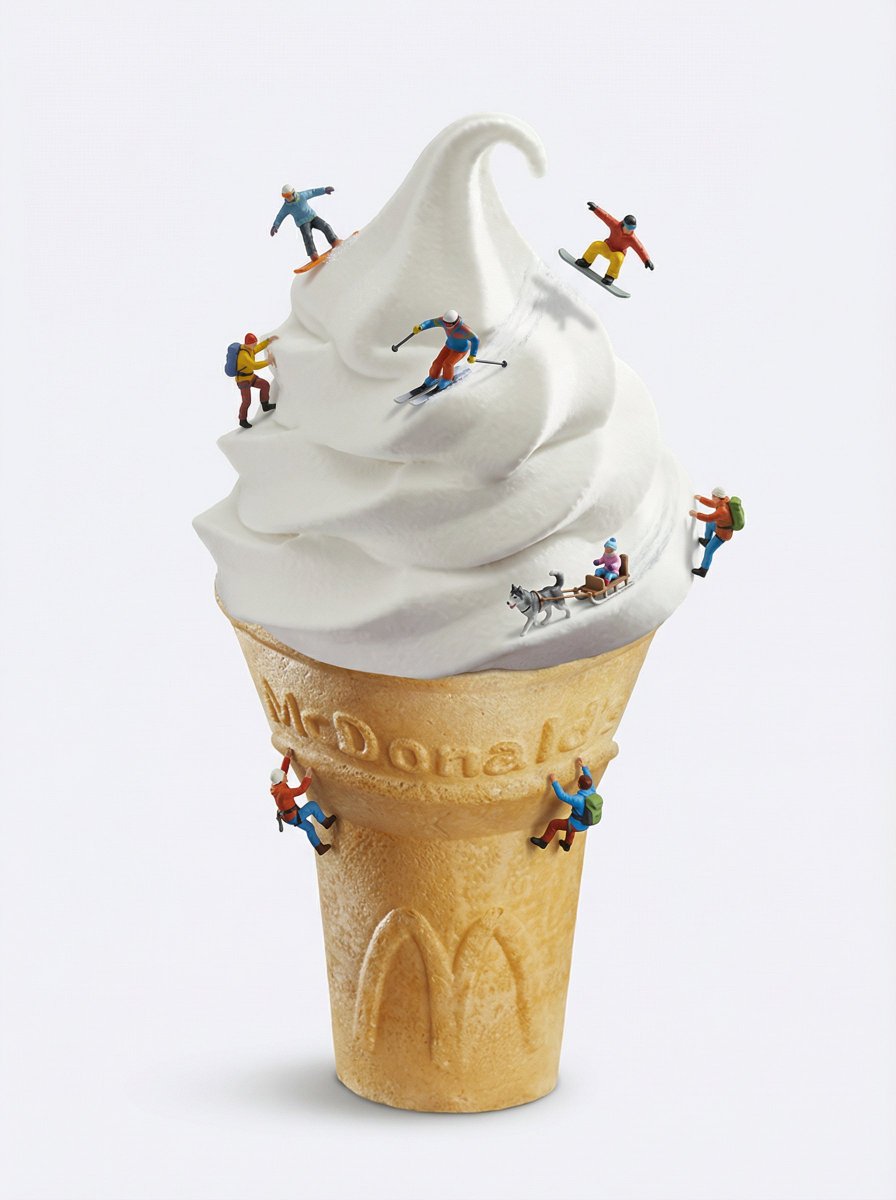
How to add ultra-tiny realistic skiing, snowboarding, and winter-sports action figures interacting with the surfaces of the uploaded image.
0
Times used
0
Likes
Transform Your Photos: A Deep Dive into the "Ultra-tiny Realistic Skiing" AI Style
Have you ever looked at a scoop of vanilla ice cream and seen a perfect, untouched ski slope? Or imagined tiny adventurers navigating the crinkled landscape of your bedsheets? With the power of AI, these whimsical daydreams can become stunningly realistic works of art. Welcome to the world of miniature marvels, brought to life by Orno's groundbreaking AI image generation style: "Create an add Ultra-tiny Realistic Skiing."
This isn't just about adding a simple sticker to your photo. It's about using sophisticated generative AI to create a new reality within your image. This detailed guide will explore how you can use Orno to add ultra-tiny, photorealistic skiing, snowboarding, and other winter-sports action figures that seamlessly interact with the surfaces of any picture you upload. Prepare to turn the mundane into the magical and create images that are bound to stop the scroll.
What Exactly is the "Ultra-tiny Realistic Skiing" AI Effect?
The "Ultra-tiny Realistic Skiing" style is an advanced AI-powered feature within the Orno photo editor that populates your images with miniature, lifelike winter sports athletes. Imagine a tiny, perfectly rendered skier carving a fresh track down the frothy foam of your morning cappuccino, or a minuscule snowboarder catching air off the spine of a book. That's the magic this tool delivers.
What sets this AI style apart is its profound understanding of context and reality. The AI doesn’t just place a pre-made figure onto your image. Instead, it analyzes your photo's key elements:
- Lighting and Shadows: The AI identifies the light source in your photo and generates tiny figures with perfectly matching shadows, making them look naturally embedded in the scene.
- Texture and Surface: Whether it's the powdery texture of flour, the glossy surface of a chocolate cake, or the rough grain of a wooden table, the AI ensures the figures interact believably with the surface, even kicking up tiny bits of "snow."
- Perspective and Scale: The tool intelligently scales the figures to maintain a believable, ultra-tiny perspective, enhancing the surreal and delightful miniature effect.
By leveraging powerful generative fill and inpainting technologies, Orno creates a cohesive and captivating scene that blurs the line between photography and fantasy. This is the future of creative photo editing—instant, intuitive, and incredibly impressive.
How to Add Tiny Skiers to Your Photos: A Step-by-Step Guide
You don't need to be a professional photo editor or a prompt engineering wizard to create these amazing images. Orno makes the process fun and accessible for everyone. Follow these simple steps to create your first miniature masterpiece.
Step 1: Choose Your Playground (The Base Image)
The first step is selecting the right photo. The beauty of this AI style is that almost any image can be transformed into an epic winter sports arena. The most ordinary objects often produce the most extraordinary results. Look for images with interesting shapes, textures, and contours. Here are some ideas to get you started:
- Food & Drink: A scoop of ice cream, a whipped cream-topped dessert, a loaf of bread, a pile of sugar or flour, a foamy latte.
- Household Items: A crumpled blanket, a stack of books, a bar of soap, a computer keyboard, a pillow.
- Nature Close-ups: A mossy rock, a large leaf, a mushroom cap, a piece of driftwood.
A clear, high-resolution photo will give the AI more detail to work with, resulting in a more realistic and impressive final image.
Step 2: Upload Your Image to Orno
Once you have your chosen image, simply navigate to the Orno AI image editor and upload it. Our platform is designed for a smooth and straightforward user experience, allowing you to get from upload to creation in just a few clicks.
Step 3: Select the "Ultra-tiny Realistic Skiing" Style
This is where the magic happens. Browse Orno's extensive library of AI styles and select "Create an add Ultra-tiny Realistic Skiing." This pre-trained prompt tells our AI exactly what you want to achieve: adding miniature, dynamic, and realistic winter sports figures to your scene.
Step 4: Guide the AI (Optional but Fun!)
While the one-click style is powerful enough to produce incredible results on its own, you can add a simple text prompt to further refine your vision. Think of it as giving the AI a little creative direction. Select an area on your image where you want the action to happen and describe what you see. For example:
- "A tiny snowboarder grinding the edge of this croissant."
- "Three tiny skiers racing down the side of this cake."
- "A miniature figure ice skating on the frozen puddle."
- "Add a tiny cross-country skier on top of the whipped cream."
This step allows for infinite customization, letting you create a scene that is truly unique to your imagination.
Step 5: Generate, Review, and Share!
Click the "Generate" button and watch as Orno's AI brings your miniature world to life in seconds. The tool will often provide you with a few different variations, allowing you to choose the one that best captures your vision. Once you've selected your favorite, you can save the high-resolution image and share your incredible creation with the world. Prepare for your social media engagement to skyrocket!
Unleash Your Creativity: Ideas and Inspiration
The "Ultra-tiny Realistic Skiing" style is a gateway to boundless creativity. To spark your imagination, here are some creative concepts and themes to explore with this powerful AI tool.
Foodscapes: The Culinary Playground
Turn your kitchen into an extreme sports park. The textures and shapes of food provide the perfect canvas for miniature adventures. Try generating a skier on a tiramisu, a snowboarder on a stack of pancakes drizzled with syrup, or a tiny toboggan team sliding down a banana split. These images are not only visually stunning but also incredibly shareable, tapping into the popular "tiny food" trend.
Office Olympics: The 9-to-5 Slopes
Bring some excitement to the workday by transforming everyday office supplies into a winter wonderland. Imagine tiny skiers navigating the steep cliffs of a stapler, or a snowboarder doing tricks on the curve of a computer mouse. It’s a fun, relatable concept that can add a touch of humor and creativity to professional or marketing content.
Nature's Miniature Arena
Use close-up shots of nature to create breathtaking scenes. A tiny figure skiing on a dew-covered leaf, a mountaineer climbing a pinecone, or a snowboarder on a moss-covered stone can create a powerful sense of scale and wonder. This approach combines the beauty of nature photography with the surreal magic of AI generation.
Why Orno is the Best AI Tool for Creating Tiny Figures
While many AI image generators exist, Orno is specifically optimized for creative photo editing styles like this one. Our AI model excels at what's known as "context-aware inpainting" and "generative fill."
Unlike other tools that might require complex, paragraph-long prompts to get a decent result, Orno's dedicated style streamlines the process. We've trained our AI to understand the specific nuances of creating realistic miniature figures—the physics of their interaction with surfaces, the subtle play of light, and the importance of scale. This means you get more believable and higher-quality results with far less effort. With Orno, you're not just an AI user; you're a creative director.
Frequently Asked Questions (FAQ)
Do I need any photo editing experience to add tiny skiers to my photos?
Absolutely not! Orno's "Ultra-tiny Realistic Skiing" style is a one-click solution designed for everyone. Whether you're a seasoned graphic designer or someone who has never edited a photo before, you can create professional-quality, stunning images in seconds.
What are the best types of photos to use for this AI style?
Images with clear subjects and interesting textures or landscapes work best. Close-ups of food, everyday objects with unique shapes (like a crumpled piece of paper or a fabric fold), and macro shots of nature are fantastic starting points. A well-lit, high-resolution image will always provide the AI with more data, leading to a more detailed and realistic output.
Can I create tiny figures other than skiers and snowboarders?
Yes! While the base style is optimized for winter sports, you can easily guide the AI with a simple text prompt. Try asking for "a tiny hiker with a backpack," "a miniature kayaker in the coffee," or "a tiny cyclist on the book cover." The possibilities are truly endless, allowing you to adapt the miniature effect to any theme you can imagine.
How does the AI make the tiny figures look so realistic?
Orno employs a sophisticated generative AI model that performs a deep analysis of your uploaded image. It maps the light sources, calculates shadow angles and softness, understands the three-dimensional perspective, and recognizes surface textures. It then generates the new pixels for the tiny figure from scratch, ensuring it perfectly matches all of these environmental conditions for a seamless and photorealistic integration.
Can I use the images I create for my social media or business?
Yes, the images you create with Orno can be a powerful asset for your social media channels, marketing campaigns, blogs, or personal projects. These unique and eye-catching visuals are designed to boost engagement and make your content stand out. For specific details on commercial usage rights, please refer to our terms of service.
The "Create an add Ultra-tiny Realistic Skiing" style is more than just a filter; it's a tool for imagination. It empowers you to see the world differently and to share that unique vision with others. So find a photo, upload it to Orno, and start building your own miniature world today. The slopes are calling!
Use This Prompt
Transform your images with AI
Save this prompt as its own icon for one-tap access.