
Create a 90s Style Portrait
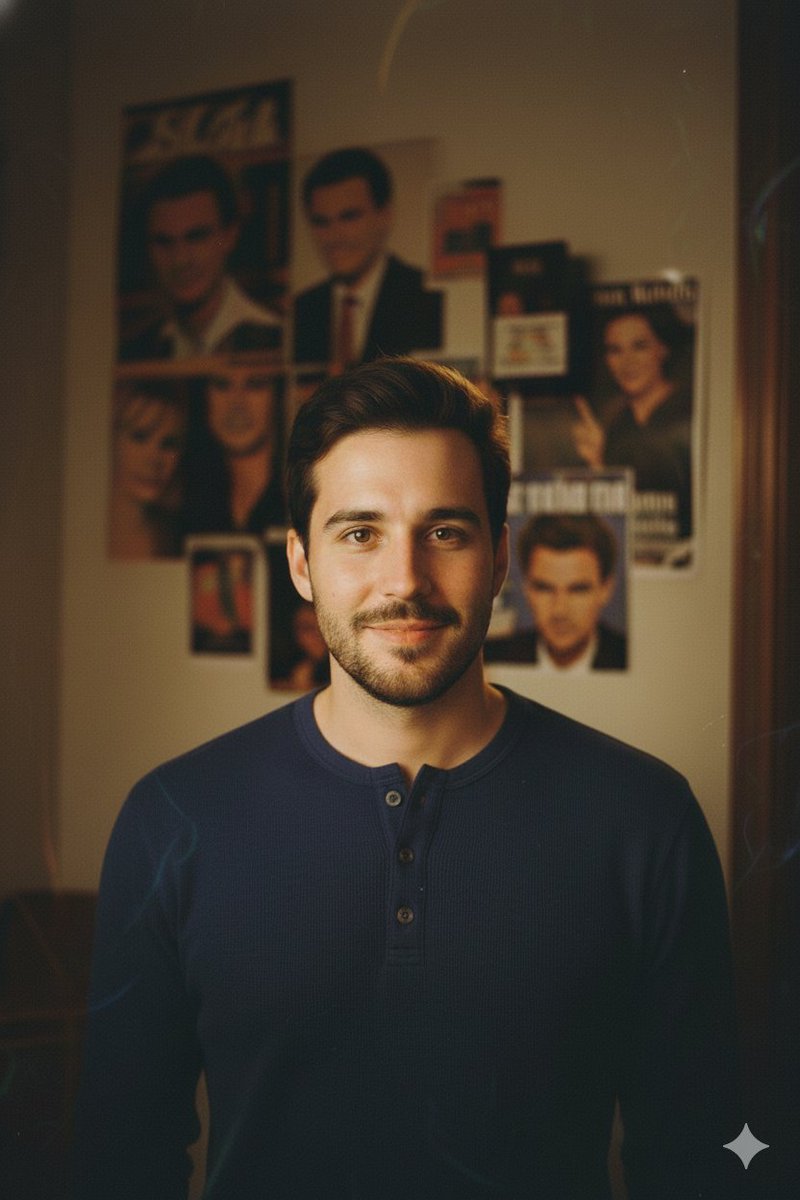
How to 90s style portrait of the same man as in the reference photo, keeping his exact facial features and expression.
1
Times used
0
Likes
Unlock Nostalgia: How to Create the Perfect 90s Style Portrait with AI
Remember the 90s? It was an era of dial-up internet, blockbuster video rentals, and a distinct visual style that is now surging back into popularity. From the soft-focus glow of sitcoms to the grainy, authentic feel of film photography, the 90s aesthetic is pure nostalgia. What if you could transport yourself back to that decade, creating a perfect 90s style portrait without a time machine? With Orno’s advanced AI image editor, you can. Our "Create a 90s Style Portrait" tool isn't just a simple filter; it's a powerful AI generator that meticulously rebuilds your photo with an authentic retro vibe while, crucially, keeping your exact facial features and expression intact.
Whether you're looking to create a unique social media profile picture, a nostalgic gift, or just have fun with a throwback look, this guide will explore everything about the 90s portrait aesthetic and show you how to effortlessly create your own using Orno. Get ready to embrace the charm of film grain, classic color palettes, and that unmistakable 90s cool.
What Defines the Iconic 90s Portrait Aesthetic?
Before we dive into how our AI works its magic, let's break down the key ingredients that make a photo scream "90s." Understanding these elements helps appreciate the complexity of what Orno’s AI recreates. It’s a delicate balance of technology, color science, and artistic flair that defined the decade's photography.
The "Film Look": Grain, Softness, and Analog Soul
In the 90s, digital photography was in its infancy. The vast majority of photos, from family snapshots to professional studio portraits, were captured on 35mm film. This analog medium is the heart and soul of the 90s look. Unlike today’s hyper-sharp, crystal-clear digital images, film photography has a tangible texture. This is primarily due to:
- Film Grain: Tiny, light-sensitive particles in the film emulsion created a subtle, organic texture in the final image. This "grain" adds depth and character, a far cry from the sterile perfection of digital noise. Orno’s AI doesn’t just overlay a grain pattern; it intelligently integrates a realistic film grain effect that interacts with the light and shadows of your portrait.
- Soft Focus: Lenses and cameras of the era often produced a slightly softer image than their modern counterparts. This wasn't a flaw; it was part of the charm, resulting in flattering portraits that felt more dreamy and less clinical. Our AI recreates this gentle softness without losing the crucial details of your face.
- Dynamic Range: Film, especially consumer-grade stocks like Kodak Gold or Fuji Superia, had a unique way of handling highlights and shadows. It often resulted in slightly crushed, faded blacks and soft, glowing highlights, contributing to the overall nostalgic and warm feeling.
Classic 90s Color Palettes and Grading
The color science of 90s film is instantly recognizable. The way colors were rendered was distinct, and this has been emulated in countless movies and shows trying to capture the era's vibe. The AI behind our "90s Style Portrait" has been trained on thousands of images to understand and replicate these specific color profiles. Key characteristics include warm-toned skin, slightly desaturated blues, and an overall cozy, inviting feel. Think of the earthy tones of a grunge-era photoshoot or the bright-yet-soft pastels of a pop album cover. Orno’s generator applies this vintage color grading authentically to your image.
Lighting and Composition: The Studio and the Candid
Two dominant styles of portrait lighting stood out in the 90s. The first was the classic "Olan Mills" style studio portrait, often featuring a mottled blue or gray background and soft, diffused lighting that aimed to be as flattering as possible. The second was a more candid, on-camera flash look, which created direct light, slight shadows, and the occasional red-eye—all hallmarks of a disposable camera snapshot. Our AI can lean into these styles, creating a portrait that feels like it was either professionally taken in 1996 or snapped at a party.
How Orno's AI Creates Your Perfect 90s Portrait with Unmatched Accuracy
Many online tools promise a "90s filter," but often, this is just a simple color overlay that fails to capture the essence of the era and can distort your appearance. Orno is different. Our tool is built on a sophisticated generative AI model designed for one primary goal: authenticity and personal identity preservation.
Advanced Facial Recognition: It’s Still You
The core of our "90s Style Portrait" prompt is the instruction: "...keeping his exact facial features and expression." This is where Orno truly shines. When you upload your reference photo, our AI performs a deep analysis of your facial structure. It maps everything: the curve of your smile, the shape of your eyes, the bridge of your nose, and your unique expression. The AI doesn't just "guess" what you look like; it uses this detailed facial map as a non-negotiable foundation. The final generated image is built around *you*, ensuring the person in the 90s portrait is recognizably, authentically you.
Intelligent Style Transfer, Not a Simple Filter
Once your facial identity is secured, the AI begins the process of style transfer. It intelligently weaves the aesthetic elements of the 90s into your photo. It’s not pasting a filter on top; it's regenerating the image from the ground up, guided by the 90s style parameters. It re-imagines the lighting, introduces organic film grain, adjusts the color grade, and softens the focus—all while constantly checking against your original facial map to ensure perfect consistency. This generative process results in a far more integrated and believable retro portrait than any simple photo filter could ever achieve.
Step-by-Step Guide: Your 90s Transformation in Moments
Ready to travel back in time? Creating your AI-generated 90s portrait with Orno is incredibly simple and takes just a few clicks. No Photoshop skills required!
- Choose Your Best Reference Photo: For optimal results, start with a clear, well-lit photo where your face is easily visible. A straight-on shot or a slight head turn works best. High-resolution photos provide the AI with more data to work with, leading to a more accurate result.
- Select the "90s Style Portrait" Tool: Navigate to Orno's library of AI image styles and find the "Create a 90s Style Portrait" option. This pre-set style is engineered for this specific nostalgic transformation.
- Upload and Generate: Upload your chosen photo. The tool automatically applies the underlying prompt. With a single click on "Generate," you'll set our powerful AI in motion. It will analyze your face and rebuild the image with the perfect 90s aesthetic.
- Download and Share: In just a few moments, your new 90s portrait will be ready. You can download the high-resolution image and share your incredible retro look on Instagram, TikTok, Facebook, or any other platform. Get ready for the comments to roll in!
Creative Ways to Use Your AI-Generated 90s Portrait
Now that you have your awesome new portrait, what can you do with it? Here are just a few ideas to get your creative juices flowing:
- The Ultimate Profile Picture: Stand out from the crowd with a unique, retro profile picture that oozes cool and personality.
- A Nostalgic Gift: Transform a recent photo of a friend or family member into a 90s gem. It's a fun, personal, and unforgettable gift for birthdays or holidays.
- Spice Up Your Social Media: Dominate "Throwback Thursday" (#TBT) with a picture that looks authentically vintage, even if it was generated five minutes ago.
- Creative Projects: Are you a musician, artist, or content creator? Use your 90s portrait for album art, posters, or branding materials to instantly establish a retro vibe.
- Just for Fun: Turn photos of you and your friends into the cast of a 90s sitcom or the cover of a grunge band's debut album. The possibilities are endless and endlessly entertaining.
Frequently Asked Questions (FAQ)
What kind of photo works best for the 90s style portrait generator?
A clear, well-lit, forward-facing portrait is ideal. Try to use a photo where your facial features are not obscured by shadows, hair, or objects. The higher the quality of your original photo, the better the AI can preserve your likeness.
Will the AI change my face or make me look like someone else?
No. This is the key advantage of Orno. Our AI is specifically designed to adhere to the reference photo, preserving your exact facial features and expression. While the style, lighting, and colors will change, the person in the photo will remain 100% you.
Is this just a 90s photo filter like on Instagram?
Not at all. A filter is a simple overlay. Orno uses generative AI to deconstruct your original image and rebuild it from scratch in the new style. It understands the physics of 90s photography—from the film grain to the lens softness—to create a much more authentic and integrated result.
Can I use Orno to create other AI image styles?
Absolutely! The "90s Style Portrait" is just one of hundreds of powerful AI styles available in the Orno suite. You can transform your photos into oil paintings, cartoon characters, futuristic cyberpunk art, and so much more. Explore our library to unlock your full creative potential.
Can I create a 90s portrait of a woman or a group of people?
Yes! While our example prompt for the style says "of the same man," the technology is universal. It works perfectly for any gender, age, or ethnicity. You can also use it on photos with multiple people to create a full 90s-era group shot.
The 90s are calling, and now you have a direct line. Forget clunky software and basic filters. Orno's "Create a 90s Style Portrait" tool offers an authentic, high-fidelity, and incredibly easy way to step back in time. Ready to see your retro self? Try the Orno AI 90s Portrait Generator today!
Use This Prompt
Transform your images with AI
Save this prompt as its own icon for one-tap access.