
Create a 佳能相机,85mm 定头,生成 1
How to 佳能相机,85mm 定头,生成 1. 8F、2.
0
Times used
0
Likes
Unlock Professional Photography with AI: A Deep Dive into the "佳能相机,85mm 定头" Style
In the world of photography, certain combinations of gear are legendary. They produce a look, a feel, an aesthetic that is instantly recognizable and universally admired. One such combination is a Canon camera paired with a classic 85mm prime lens. This duo is the gold standard for portrait photographers, celebrated for its ability to capture stunningly sharp subjects against a beautifully blurred background. But what if you could achieve this million-dollar look without touching a camera? Welcome to the future of image creation, powered by Orno's AI. The prompt style, "佳能相机,85mm 定头,生成 1" (Canon camera, 85mm prime lens, generate 1), is your digital key to unlocking this professional-grade aesthetic. This guide will explore every facet of this powerful AI style, teaching you how to craft breathtaking, photorealistic images that look like they were shot by a seasoned pro.
What is the "佳能相机,85mm 定头" AI Style?
At its core, this prompt is a command to Orno's advanced AI engine, instructing it to simulate the specific characteristics of a high-end photography setup. It's not just about creating a picture; it's about replicating a process and an artistic outcome. Let's break down the core components to understand the magic at work.
佳能相机 (Canon Camera): The Soul of Color
When you include "佳能相机" or "Canon camera" in your prompt, you're tapping into decades of color science. Canon cameras are renowned for their color reproduction, especially their warm, pleasing skin tones. Orno's AI has been trained on countless images shot with Canon cameras, allowing it to understand and replicate this signature color profile. This results in AI-generated portraits that look vibrant, natural, and full of life, avoiding the flat or artificial look that can plague lesser AI generators.
85mm 定头 (85mm Prime Lens): The Portrait King
The "85mm 定头" (85mm prime lens) is the most critical part of this style. In photography, an 85mm lens is beloved for two main reasons:
- Flattering Compression: This lens allows you to stand at a comfortable distance from your subject while still filling the frame. This creates a natural "compression" effect, which slims facial features and avoids the wide-angle distortion that can make noses and foreheads look larger. Orno's AI emulates this optical property, ensuring your generated portraits are always flattering and proportional.
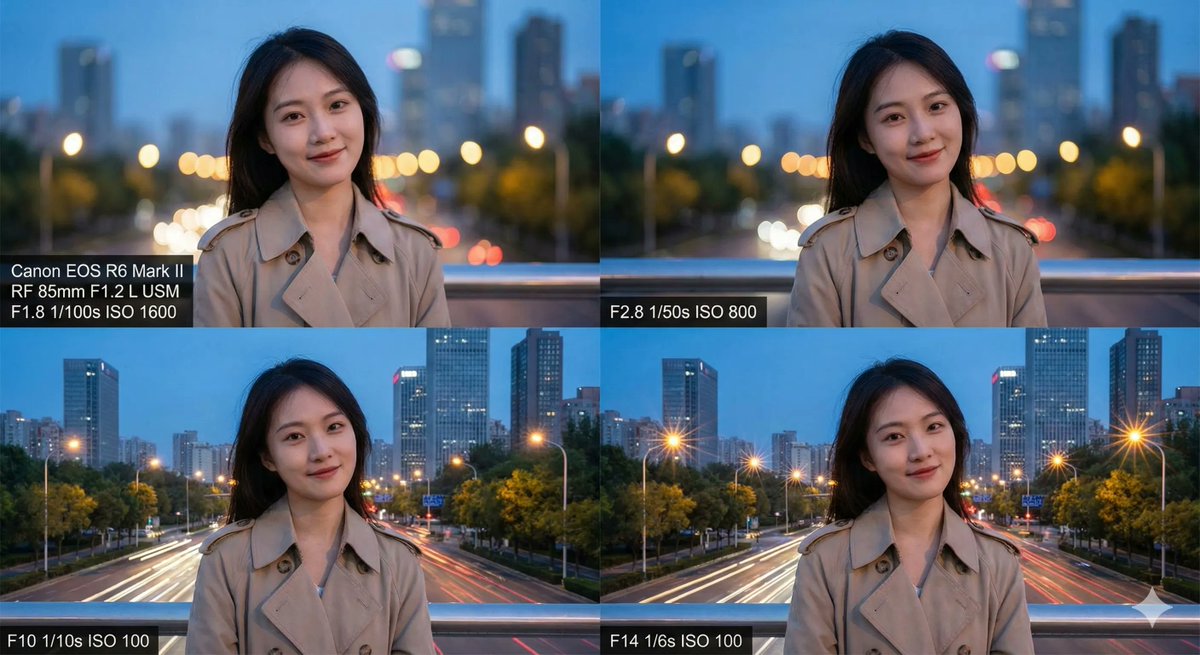
- Shallow Depth of Field: Prime lenses, especially at the 85mm focal length, typically have very wide apertures (like f/1.8 or f/1.4). This creates an extremely shallow depth of field, which is the secret behind the creamy, out-of-focus backgrounds known as "bokeh." This effect makes the subject pop, drawing all the viewer's attention to them.
By combining these two elements, the "佳能相机,85mm 定头" prompt tells Orno to generate an image that is not only photorealistic but also possesses the specific, sought-after qualities of professional portrait photography.
Mastering Depth of Field: A Guide to AI Aperture Control
The description for this style mentions "8F、2.", which refers to f/8 and f/2—two common aperture settings (f-stops) in photography. Understanding and using these in your Orno prompts is the key to moving from a beginner to an advanced AI artist. Aperture controls how much of your image is in focus, a concept known as depth of field.
Decoding the Aperture: f/2 vs. f/8
Think of aperture as the pupil of the camera's eye. A wider opening (a smaller f-number like f/1.8 or f/2) lets in more light and creates a very shallow depth of field. A smaller opening (a larger f-number like f/8 or f/11) lets in less light and creates a deep depth of field.
- Use a wide aperture (e.g., f/1.8, f/2) for Dreamy Bokeh: When you want to isolate your subject and create that beautiful, blurry background, add a low f-number to your prompt. This is perfect for single-subject portraits, close-ups, and creating a cinematic, artistic feel.
Example Prompt:A beautiful woman smiling, golden hour sunlight, 佳能相机,85mm 定头,f/1.8, creamy bokeh background - Use a narrow aperture (e.g., f/8, f/11) for Sharp Detail: When you want more of the scene to be in focus, use a higher f-number. This is ideal for environmental portraits where the background is important to the story, group photos where you want everyone to be sharp, or landscape-style shots.
Example Prompt:An old fisherman standing on a pier, detailed face, cloudy day, 佳能相机,85mm 定头,f/8, sharp focus on the sea behind him
With Orno's sophisticated text-to-image AI, you can precisely control the depth of field just by typing in the camera setting you want. This level of creative control is what sets Orno apart as a premier tool for digital artists and creators.
Step-by-Step: Creating a Photorealistic Portrait with Orno
Ready to create your own masterpiece? It’s easier than you think. Follow these simple steps to harness the full power of the "Canon 85mm" style in Orno.
Step 1: Envision Your Subject and Scene
Before you write a single word, have a clear idea in your mind. Who is your subject? What are they doing? What is the mood? Where are they? Let's imagine we want to create a photo of a thoughtful, young male architect in his modern office.
Step 2: Craft a Detailed Prompt
Start building your prompt layer by layer. The more detail you provide, the better Orno can interpret your vision.
- Start with the Subject: "A handsome young architect with short hair and glasses, looking thoughtfully at a blueprint."
- Add the Core Style: "A handsome young architect... 佳能相机,85mm 定头..."
- Specify the Aperture and Lighting: "...f/2.2, soft natural light coming from a large window on the side..."
- Describe the Setting and Mood: "...in a minimalist, modern office with concrete walls, cinematic, hyperrealistic, high detail."
Your final prompt would look something like this: A handsome young architect with short hair and glasses, looking thoughtfully at a blueprint, 佳能相机,85mm 定头,f/2.2, soft natural light coming from a large window on the side, in a minimalist, modern office with concrete walls, cinematic, hyperrealistic, high detail.
Step 3: Generate and Refine in Orno
Paste your prompt into the Orno AI image generator and click "Generate." In seconds, Orno will present you with several image options based on your text. From here, you can choose your favorite, or use Orno's powerful editing tools to upscale the resolution for incredible detail, use inpainting to fix any small imperfections, or generate new variations to explore different creative directions.
Advanced Prompting Techniques for the "Canon 85mm" Style
Once you've mastered the basics, you can start combining the "佳能相机,85mm 定头" style with other modifiers to achieve truly unique and stunning results.
- Film Emulation: Add keywords like "Kodak Portra 400," "Fujifilm Superia," or "35mm film grain" to give your images a nostalgic, analog feel.
- Lighting Control: Be specific with your lighting. Use terms like "rim lighting," "backlit," "dramatic studio lighting," "neon glow," or "golden hour" to dictate the mood and atmosphere.
- Compositional Keywords: Guide the AI's camera placement with prompts like "close-up shot," "medium shot," "full body shot," "from a low angle," or "rule of thirds composition."
- Artistic Styles: Blend the photorealism of the Canon style with artistic movements. Try adding "impressionistic painting style" or "cyberpunk aesthetic" to see how the AI creatively merges the concepts.
Frequently Asked Questions (FAQ)
What exactly does "佳能相机,85mm 定头" mean in an AI prompt?
It instructs the AI to generate an image that mimics the visual characteristics of a photo taken with a Canon camera and an 85mm prime lens. This means you can expect excellent color science (especially for skin tones), a flattering perspective for portraits, and the potential for a beautifully blurred background (bokeh).
Can I use this style for subjects other than portraits?
Absolutely! While it excels at portraits, the 85mm style is fantastic for product photography, food photography, and detailed close-ups of objects. It's a great way to make any single subject the hero of your image by separating it from its background.
Do I need to be a photographer to use this style in Orno?
Not at all! That's the beauty of Orno. This guide gives you the foundational knowledge, but you don't need any technical experience. Simply including "佳能相机,85mm 定头" in your prompt is enough to instantly elevate the quality and realism of your AI generations.
How do I get the most blurry background (bokeh effect)?
To maximize the background blur, use a very wide aperture in your prompt. Add terms like "f/1.4," "f/1.8," or simply "maximum bokeh" and "shallow depth of field" to your prompt. Also, ensure your subject is described as being relatively close to the "camera."
Why are my AI images not looking perfectly realistic?
Realism comes from detail. If your images feel a bit "off," try adding more specific details to your prompt. Use keywords like "hyperrealistic," "ultra-detailed," "sharp focus," and describe textures like "detailed skin texture," "fabric texture," or "weathered wood." Specifying the lighting in detail also makes a huge difference.
Is Orno's AI image editor difficult to use?
Orno is designed with a user-friendly interface that caters to both beginners and professionals. The process is as simple as typing what you want to see and letting the AI do the heavy lifting. With intuitive tools for refining and editing, you have full control over your creative output. Dive in and start creating with Orno today!
Use This Prompt
Transform your images with AI
Save this prompt as its own icon for one-tap access.