
Create a この画像の人物を使って8つのline
How to この画像の人物を使って8つのLINEスタンプを作りたいです。(添付画像を載せる)
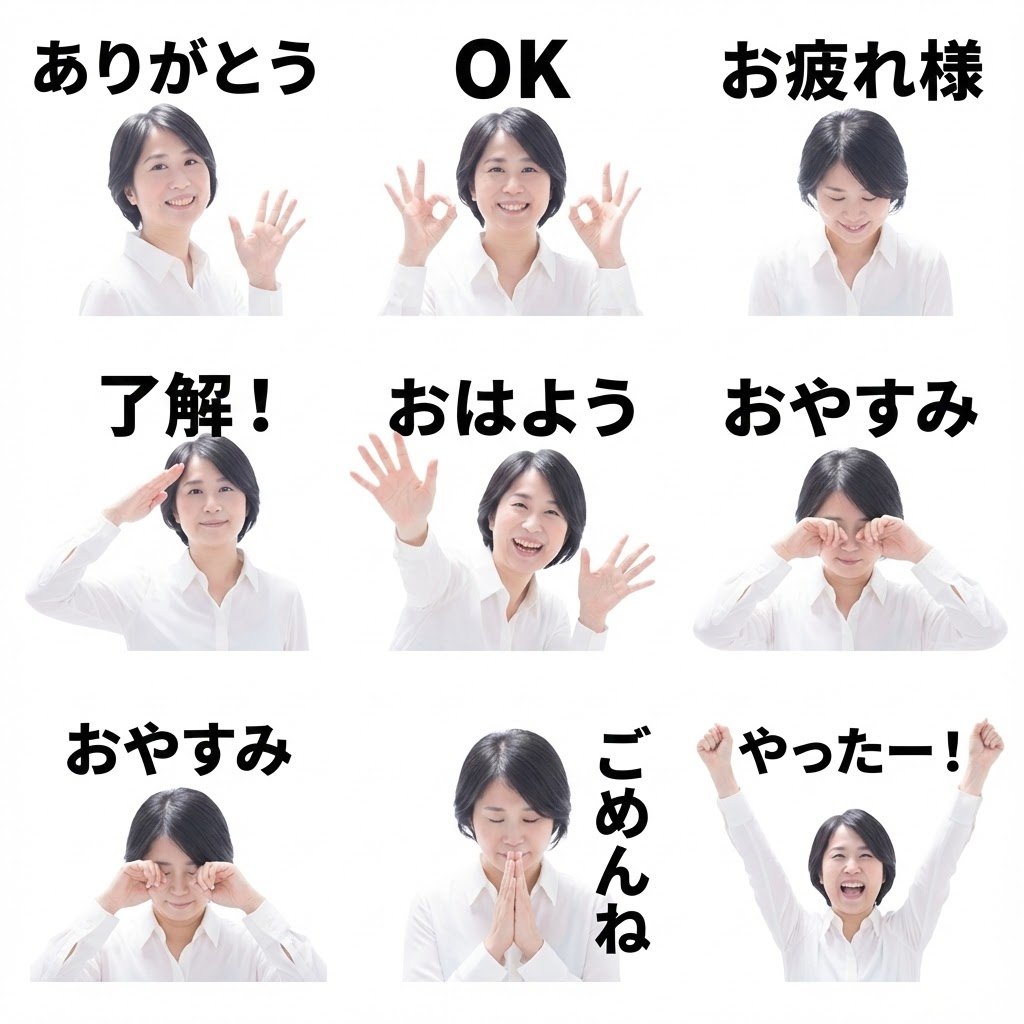
0
Times used
0
Likes
Transform Your Photos into Custom LINE Stickers with AI
In the vibrant world of digital communication, stickers are more than just images; they're a language of their own. They convey emotion, inside jokes, and personality in a way that text alone never can. LINE, one of the world's most popular messaging apps, has turned sticker creation into an art form. But what if you're not an artist? What if you lack the time or a "I want to create 8 LINE stickers using the person in this image." (この画像の人物を使って8つのLINEスタンプを作りたいです。). In this comprehensive guide, we'll dive deep into this revolutionary AI image generation style, explore how you can use it with Orno’s powerful AI image editor, and unlock a new level of personal expression in your chats.
What Exactly is the "この画像の人物を使って8つのline" Style?
At first glance, the Japanese phrase might seem complex, but its meaning is a powerful command for an AI. Let's break it down:
- この画像の人物 (kono gazou no jinbutsu): "The person in this image"
- を使って (wo tsukatte): "Using"
- 8つの (yattsu no): "Eight"
- LINEスタンプ (LINE sutampu): "LINE stickers"
- を作りたいです (wo tsukuritai desu): "I want to create"
Put it all together, and you have a precise instruction: "I want to create 8 LINE stickers using the person in this image." This isn't just a simple text-to-image prompt; it's an advanced image-to-image command. It tells Orno's AI to analyze a source photo you provide and then generate a complete set of eight unique, expressive stickers that maintain the likeness of the person in the original picture. It’s the ultimate tool for creating a consistent, personalized AI sticker pack in minutes.
Why Use Orno's AI to Create Your Custom LINE Stickers?
While the LINE Creator Market offers millions of stickers, nothing beats the personal touch of your own creations. Orno’s AI-powered "Create a この画像の人物を使って8つのline" style makes this process incredibly simple and fun. Here’s why it's a game-changer.
Unleash Your Creativity, No Art Skills Required
Forget spending hours learning complex software like Photoshop or trying to draw. With Orno, your creativity is the only limit. You provide a photo, and our advanced AI acts as your personal artist. It intelligently interprets the facial features and essence of the person in the photo and reimagines them in a variety of classic sticker emotions—happy, sad, laughing, angry, and more. It’s a seamless transition from a simple photograph to a dynamic, shareable sticker pack.
Achieve Perfect Character Consistency
One of the biggest challenges in AI image generation is creating multiple images of the same character without variations. This style is specifically engineered to solve that problem. By using your uploaded photo as a strong reference point, the AI ensures that all eight stickers look like the same person. This consistency is crucial for creating a cohesive and professional-looking sticker set that people will instantly recognize.
Endless Personalization for Every Occasion
The possibilities for personalization are limitless. Create a sticker pack featuring:
- Yourself: Become the star of your own chats with a range of stickers capturing your signature expressions.
- Friends and Family: Surprise a loved one with a hilarious and heartwarming sticker set for their birthday or a special event.
- Your Pet: Turn your beloved cat or dog into an adorable, chat-ready character.
- Inside Jokes: Immortalize a funny moment or a friend's classic catchphrase in sticker form.
Fast, Fun, and Incredibly Efficient
The traditional process of creating a sticker pack involves brainstorming, sketching, illustrating, and formatting—a process that can take days. Orno's AI condenses this entire workflow into a few clicks and a matter of seconds. Generate, review, and regenerate until you have the perfect set. It’s an engaging and rewarding creative process that delivers instant results.
How to Use the "Create a この画像の人物を使って8つのline" Style in Orno: A Step-by-Step Guide
Ready to create your first AI sticker pack? Orno makes the process intuitive. Follow these simple steps to bring your vision to life.
Step 1: Navigate to the Style Page
First, head to the Orno AI image editor and find our style library. Select the style titled "Create a この画像の人物を使って8つのline". This will load the pre-configured prompt and settings designed specifically for sticker pack generation.
Step 2: Upload Your High-Quality Reference Image
This is the most crucial step. The quality of your output depends heavily on the quality of your input. For the best results, choose a source photo that is:
- Clear and Well-Lit: The face should be clearly visible without heavy shadows or overexposure.
- High-Resolution: A sharp, non-blurry image gives the AI more data to work with.
- Forward-Facing: A photo where the person is looking at or near the camera often works best.
- Simple Background: A clean background helps the AI focus solely on the person.
Step 3: Refine Your Prompt with Keywords (Optional)
The core prompt is already set up for you. However, you can add descriptive keywords to guide the AI's creative direction. Want a specific theme? Add it in! This is where you can fine-tune the emotions and actions in your sticker pack. Try adding words like:
- Emotions: joyful, laughing, crying, angry, surprised, confused, sleepy, in love
- Actions: waving, thumbs up, facepalm, thinking, celebrating, eating, drinking coffee
- Styles: chibi, cute, anime style, watercolor, cartoonish
For example, you could modify the prompt slightly to: "Create a この画像の人物を使って8つのline, chibi style, celebrating, eating cake, sleepy".
Step 4: Generate, Review, and Download
Click the "Generate" button and watch as Orno’s AI works its magic. In moments, you will be presented with a grid of eight unique stickers based on your photo and prompts. If you’re not completely satisfied, don’t worry! You can run the generation again—each attempt will produce a new, unique set of results. Once you have a pack you love, you can easily download the images to your device, ready to be prepared for upload or shared directly with friends.
Beyond Personal Chats: Creative Uses for Your AI Stickers
While perfect for personalizing your LINE conversations, these AI-generated sticker packs have a wide range of other applications.
For Content Creators and Streamers
Build a stronger community on Twitch, YouTube, or Discord by creating custom emotes and stickers of yourself or your channel's mascot. It’s a fantastic way to engage your audience and offer unique perks to subscribers.
For Small Businesses and Personal Brands
Add a personal touch to your brand's communication. Create a sticker pack of your company mascot or even a friendly, cartoon version of yourself to use in customer service chats or marketing materials. It makes your brand more approachable and memorable.
For Unique Digital Gifts
Looking for a truly one-of-a-kind gift? An AI-generated sticker pack of a friend or family member is a thoughtful, fun, and modern present that they can use every single day.
Frequently Asked Questions (FAQ)
What does "この画像の人物を使って8つのline" actually mean?
It translates to "I want to create 8 LINE stickers using the person in this image." It is a specific command that tells the AI to use an uploaded photo as a reference to generate a pack of eight distinct stickers while maintaining character consistency.
Do I need to know Japanese to use this AI style?
Not at all! Orno provides a user-friendly interface. The style is pre-named and configured for you. All you need to do is select it, upload your photo, and click "Generate." You can add optional English keywords to further refine your results.
Can I use a photo of my pet to make stickers?
Yes, absolutely! The AI is surprisingly versatile. While it's optimized for human faces, it often does a wonderful job of creating adorable and expressive sticker packs of cats, dogs, and other pets. Give it a try!
Are the stickers from Orno ready to upload to the LINE Creator Market?
Orno provides you with the high-quality image assets. To sell them on the LINE Creator Market, you will need to ensure they meet LINE's specific guidelines regarding dimensions, file format (usually PNG), resolution, and content policies. You may need to do minor resizing or editing, but Orno does the heavy creative lifting for you.
How does the AI keep the person's face consistent across all 8 stickers?
This style uses a sophisticated AI technique often referred to as image-to-image generation with strong reference control. The AI doesn't just read the text; it deeply analyzes the facial structure, hair, and key features from your uploaded photo and uses that data as a foundational blueprint for every sticker it creates. This ensures a high degree of likeness across the entire set.
Start Creating Your AI Sticker Pack Today!
The era of generic, impersonal digital communication is over. With Orno's "Create a この画像の人物を使って8つのline" style, you have the power to inject your unique personality, humor, and creativity into every conversation. It’s never been easier or faster to turn a simple photograph into a full-fledged, expressive sticker pack. Stop searching for the perfect reaction sticker and start being the reaction.
Ready to see yourself as a sticker? Try the "Create a この画像の人物を使って8つのline" AI style in the Orno Image Editor now and bring your chats to life!
Use This Prompt
Transform your images with AI
Save this prompt as its own icon for one-tap access.