
Create a 4 Panel Manga Titled I
How to 4 panel manga titled "I was reincarnated into another world as an ai researcher
0
Times used
0
Likes
Unlocking a New World: How to Create a 4-Panel Manga with AI
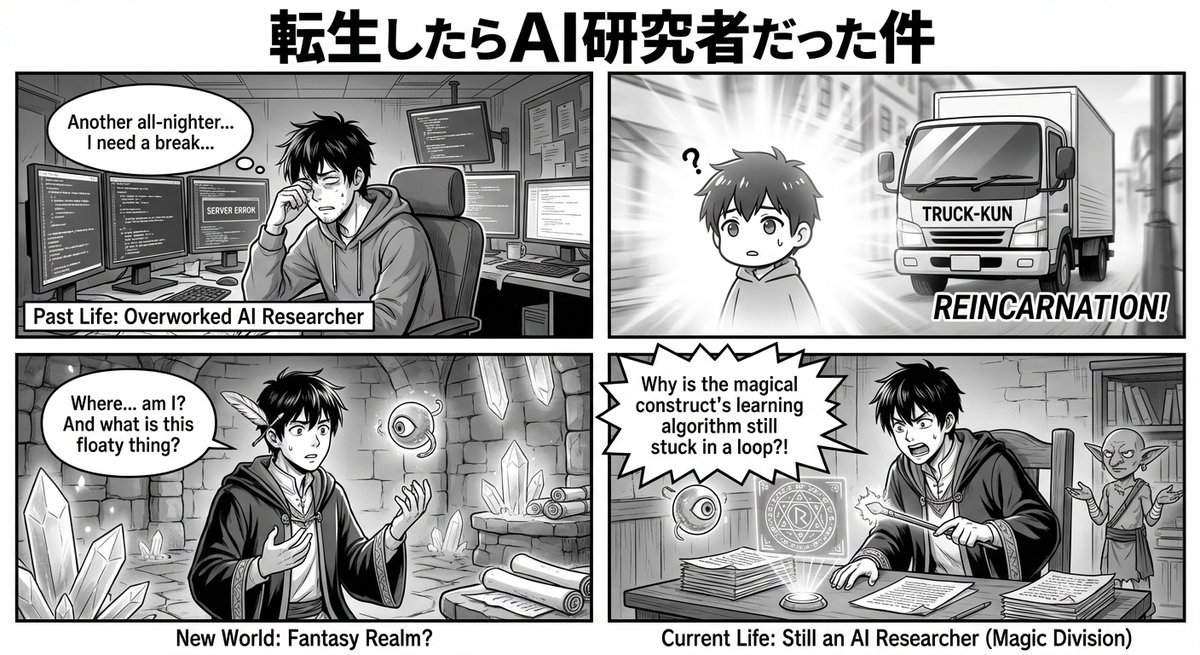
The world of manga is vast and captivating, with the isekai genre—stories about being reincarnated into another world—standing as one of its most popular pillars. From salarymen reborn as slimes to students becoming legendary heroes, the possibilities are endless. But what if the hero wasn't a warrior or a wizard, but an AI researcher? This is the brilliant premise behind the viral AI art prompt: "Create a 4 panel manga titled 'I was reincarnated into another world as an ai researcher'."
This single line of text is a masterclass in creative direction for an AI. It combines a familiar format (4-panel manga), a popular genre (isekai), and a unique, modern twist (AI research). It's a recipe for hilarious, insightful, and visually stunning short stories. And with Orno, the premier AI image editor, you have the ultimate studio at your fingertips to bring this and countless other manga sagas to life. This guide will delve into the mechanics of this fantastic prompt, showing you how to master it using Orno's powerful tools to become a master AI mangaka (manga artist).
What is the "4-Panel Manga Titled..." AI Style?
At its heart, this prompt leverages a classic Japanese comic strip format known as Yonkoma (4コマ漫画). This structure is brilliant for its simplicity and narrative power, making it perfect for AI generation. Let's break down the core components that make this prompt so effective:
- "4 Panel Manga": This command immediately tells the AI to structure the output into a grid of four distinct but related images. It sets the visual format and pacing, moving beyond a single-image generation to sequential art.
- "Titled...": By including this phrase, you are giving the AI a central theme and narrative anchor. The title acts as the creative DNA for all four panels, ensuring they tell a cohesive, albeit very short, story.
- "'I was reincarnated into another world as an ai researcher'": This is the creative gold. It establishes the protagonist, the setting (a fantasy or sci-fi "other world"), and the central conflict or comedic hook—the clash between high-tech logic and a world of magic, monsters, or medieval societies.
Using Orno's advanced text-to-image models, this prompt doesn't just generate four random anime pictures. It attempts to create a micro-narrative. You'll often see a progression: a character's bewilderment in panel one, an attempt to apply their skills in panel two, a surprising result in panel three, and a comedic or thoughtful conclusion in panel four. It’s AI-powered storytelling in its purest form.
Deconstructing the Prompt for Perfect Results with Orno
While the base prompt is powerful, the true magic begins when you start customizing it with Orno's advanced features. Understanding the structure and how to add detail is the key to moving from a fun generation to a masterpiece of your own creation.
Understanding the '4 Panel' Structure (Kishōtenketsu)
Yonkoma manga traditionally follows a narrative structure called Kishōtenketsu. When you engineer your prompts, keeping this in mind can lead to more compelling results. Orno's AI naturally gravitates toward this structure when prompted for a 4-panel story.
- Panel 1 (Ki - Introduction): This sets the scene. Your prompt could specify the introduction. For example: `...in the first panel, the AI researcher wakes up confused in a fantasy forest.`
- Panel 2 (Shō - Development): The story moves forward. Here, the character interacts with the world. For example: `...in the second panel, he discovers a grimoire and tries to scan it with his phone.`
- Panel 3 (Ten - Climax/Twist): The unexpected happens. This is the core of the story's humor or drama. For example: `...in the third panel, scanning the grimoire causes a cute but buggy fire-spirit to materialize from his phone.`
- Panel 4 (Ketsu - Conclusion): The resolution or punchline. For example: `...in the fourth panel, the researcher is frantically trying to 'debug' the mischievous fire-spirit as it sets his sleeve on fire.`
While you don't need to specify every panel, adding a key detail for one or two can help steer the AI's entire narrative in the direction you want.
Crafting Your Narrative: The "I was reincarnated..." Theme
The base title is a fantastic starting point. Now, let's make it your own. Think of yourself as the manga author. What's the specific story you want to tell? Add a clause to the title to guide the AI.
Try these variations in Orno:
- `Create a 4 panel manga titled "I was reincarnated into another world as an AI researcher, and my first assignment is teaching a dragon to code in Python".`
- `Create a 4 panel manga titled "I was reincarnated into another world as an AI researcher, but all the magic is just poorly documented ancient technology".`
- `Create a 4 panel manga titled "I was reincarnated into another world as an AI researcher, and I'm trying to build a neural network to predict prophecies".`
These additions provide the AI with richer context, leading to more specific and imaginative visuals. The more detailed your narrative seed, the more unique your resulting manga will be.
Stylistic Control with Orno's Advanced Features
This is where Orno truly shines. Don't just settle for the default style. Become the art director.
- Art Style Modifiers: Add stylistic keywords to the beginning or end of your prompt. Try "monochrome manga style," "vibrant shonen anime style," "soft watercolor shojo style," or "gritty seinen sketch style." Orno's models are trained on a massive library of artistic styles, allowing you to perfectly match the tone of your story.
- Negative Prompts: Use Orno's negative prompt field to eliminate what you don't want. If you're getting inconsistent faces or messy hands, add terms like `poorly drawn hands, blurry face, extra limbs, deformed, text, watermarks` to the negative prompt. This cleans up the final image, giving you more professional results.
- Seed Control: Find a generation you love but want to tweak? Orno allows you to use the same 'seed' number from a previous generation. This keeps the core composition and character structure the same, allowing you to change small details in the prompt (like hair color or expression) while maintaining consistency.
Step-by-Step Guide: Creating Your First 4-Panel Manga in Orno
Ready to create? It's easier than you think. Follow these simple steps to generate your first yonkoma masterpiece.
- Navigate to the Orno Generator: Open the Orno AI image editor. You'll see the main text prompt area ready for your creative genius.
- Enter the Base Prompt: Start with the core prompt. Type: `4 panel manga, monochrome style, titled "I was reincarnated into another world as an AI researcher".`
- Add Your Narrative Twist: Expand on the title with your own idea. Let's add: `...and I'm trying to optimize the mana consumption of a clumsy knight's sword skills.`
- Refine with Modifiers: Add keywords to hone the aesthetic. Let's make it more specific: `detailed background, dynamic action poses, shonen manga style.`
- Use the Negative Prompt: In the dedicated negative prompt field, add `blurry, jpeg artifacts, signature, text, worst quality` to ensure a clean output.
- Generate and Admire: Click the "Generate" button. Within seconds, Orno will process your detailed instructions and present you with a completely original 4-panel manga strip telling your unique story.
- Iterate and Perfect: Don't stop at one! Change the style, tweak the story, or use a resulting image with Orno's Image-to-Image feature to refine a specific panel. The creative loop is fast, fun, and endlessly rewarding.
Prompt Inspiration: Variations on the "Reincarnated AI Researcher" Theme
Feeling stuck? Here are some more creative prompt ideas to get you started in Orno. Use them as-is or as a springboard for your own isekai adventures.
- `Yonkoma, ghibli anime style, titled "I was reincarnated as an AI researcher to create a perfect farming golem for a peaceful village".`
- `4 panel manga, dark fantasy art, titled "A reincarnated AI researcher discovers the horrifying truth: the world is a simulation and the gods are just sysadmins".`
- `4 panel comic strip, chibi style, titled "My life as a reincarnated AI researcher trying to explain machine learning to a very dumb but very strong hero".`
- `Monochrome 4 panel manga, detailed sketch style, titled "The diary of a reincarnated AI researcher attempting to build a friendly slime AI companion".`
- `4 panel manga, shojo art style, titled "My romantic comedy with the demon king after I was reincarnated as an AI researcher to fix his castle's logistics".`
Frequently Asked Questions (FAQ)
Can I create characters that are consistent across all four panels?
Achieving perfect character consistency is one of the biggest challenges in AI image generation. However, you can get very close with Orno. The best method is to be highly descriptive in your prompt (e.g., "a male AI researcher with short black hair, glasses, and a blue lab coat") and to use the same seed number for iterative generations. Orno is constantly improving its models for even better character consistency in future updates.
Does Orno add the text and speech bubbles to the manga?
Currently, Orno's AI focuses on generating the highest quality visuals for your panels. It does not automatically add dialogue or speech bubbles. This gives you complete creative freedom! You can easily import your generated 4-panel manga into any free or paid image editing program to add your own text, sound effects, and bubbles, perfecting your story's script.
What art styles can I use for my 4-panel manga?
Virtually any style you can describe! Orno's robust AI models can interpret a huge range of artistic descriptors. Beyond "manga" or "anime," you can try "woodblock print," "pixel art," "graphic novel style," "cel-shaded," "concept art," and so much more. The only limit is your imagination. Experiment by combining styles for truly unique results!
Can I use the manga I create with Orno commercially?
Yes. With Orno's premium subscription plans, you are granted a commercial license for the images you create. This means you can use your 4-panel manga for webcomics, social media content, marketing, or even print. Please be sure to review our full Terms of Service for the specific details regarding licensing and usage rights.
Your Isekai Saga Awaits
The "Create a 4 Panel Manga Titled..." prompt is more than just a trend; it's a gateway to infinite storytelling. It demonstrates how a well-structured prompt can transform a text-to-image generator into a powerful narrative partner. By combining the classic yonkoma format with the endlessly inventive isekai genre, you can explore themes of technology, magic, and the human (or AI) condition, four panels at a time.
There's no need to wait for reincarnation. Your next adventure is just a prompt away. Dive into the Orno AI image editor, harness the power of this incredible prompt, and start creating the manga you've always wanted to read. Try Orno for free today and bring your story to life!
Use This Prompt
Transform your images with AI
Save this prompt as its own icon for one-tap access.