
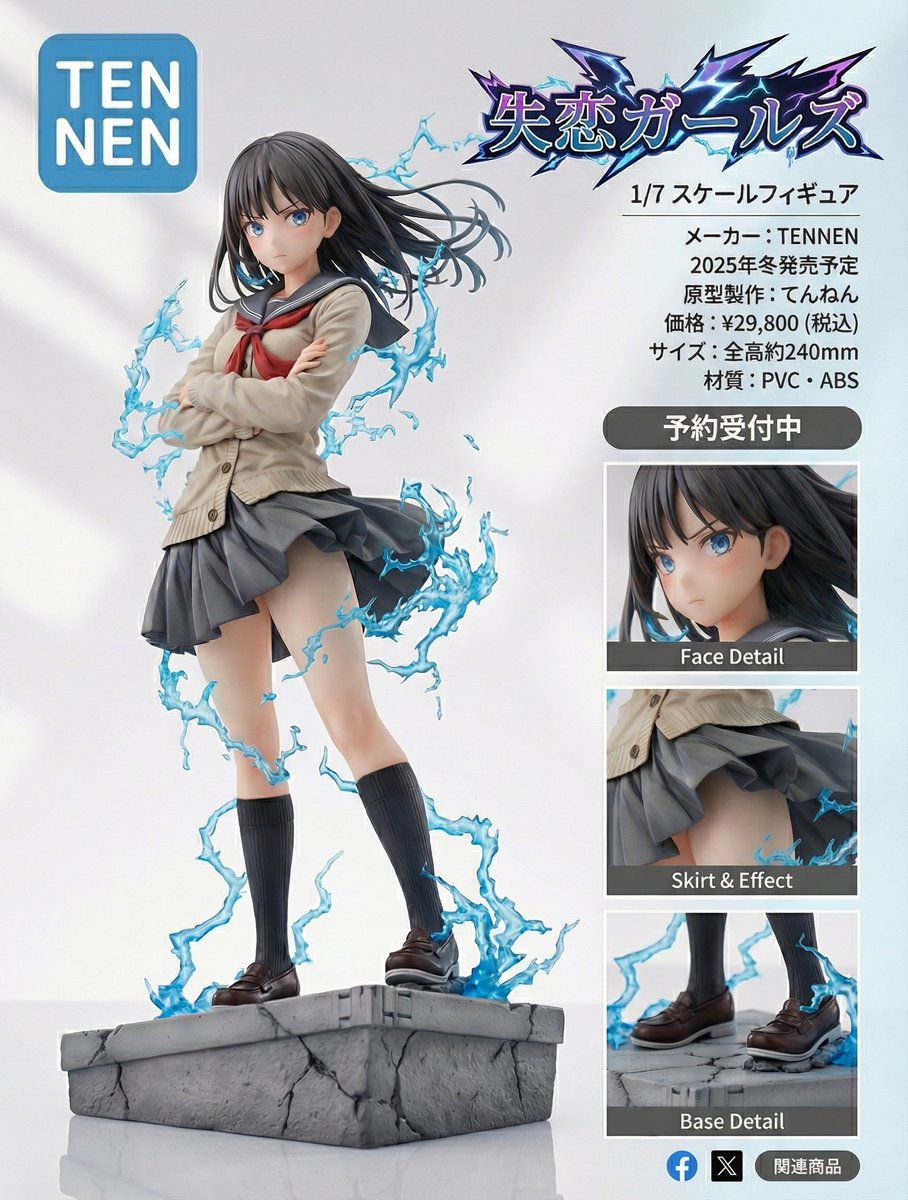
Create a この画像を超精密なフィギュア風にして 製品紹介ページデザインを作ってください。 商品名は「失恋ガールズ」です。
How to この画像を超精密なフィギュア風にして 製品紹介ページデザインを作ってください。
0
Times used
0
Likes
Unlocking a New Dimension of Creativity: The Ultimate Guide to the AI Figurine Product Page Style
In the rapidly evolving world of AI image generation, some prompts stand out not just for their artistic output, but for their sheer utility and creative power. Imagine being able to transform a simple character idea not just into a piece of art, but into a fully realized product concept, complete with a professional-looking product page. This is the magic behind the incredibly specific and powerful prompt: "この画像を超精密なフィギュア風にして 製品紹介ページデザインを作ってください。 商品名は「失恋ガールズ」です。". At Orno, we're dedicated to empowering creators with the most advanced tools, and this style is a game-changer for artists, designers, marketers, and dreamers alike. This guide will delve deep into this unique AI prompt, showing you how to master it within Orno to create stunning, hyper-detailed figurine mockups that look ready for market.
This isn't just about creating a pretty picture; it's about building a narrative and a tangible vision. Whether you're an indie game developer wanting to mock up merchandise, a novelist eager to see your characters as collectibles, or a marketing professional testing a new product idea, this prompt offers a direct path from imagination to presentation-ready visuals. Let's break down this powerful Japanese prompt and explore how Orno's AI image editor can turn your concepts into breathtakingly realistic product showcases.
Decoding the Prompt: What Are You Asking the AI to Do?
At first glance, the long Japanese string might seem intimidating, but it's a beautifully precise set of instructions for the AI. Let's translate and dissect it piece by piece to understand its genius:
- この画像を超精密なフィギュア風にして (Kono gazō o chōseimitsuna figyua-fū ni shite): This is the core artistic command. It translates to "Turn this image into a super-detailed figurine style." The key words here are "超精密な" (chōseimitsuna), meaning "super-detailed" or "hyper-precise," and "フィギュア風" (figyua-fū), meaning "figurine style." This tells the AI not to just create a 3D character, but to specifically emulate the look and feel of a high-quality, physical collectible. Think of the detailed paintwork, the subtle texture of resin or PVC, and the dynamic poses found in premium anime or gaming figures.
- 製品紹介ページデザインを作ってください (Seihin shōkai pēji dezain o tsukutte kudasai): This part elevates the prompt from a simple character generation to a full-fledged conceptual design. It means, "Please create a product introduction page design." The AI is instructed to place the generated figurine within the context of a clean, minimalist e-commerce or showcase webpage. This often includes elements like a simple background, studio-like lighting, and a professional layout.
- 商品は「失恋ガールズ」です (Shōhinmei wa 'Shitsuren Gāruzu' desu): This final piece adds the branding. It translates to "The product name is 'Heartbroken Girls'." This command instructs the AI to incorporate this text into the design, effectively branding the concept and completing the product page mockup.
When combined, these three commands form a powerful, multi-layered instruction that leverages the AI's ability to understand not just art styles, but also context, layout, and graphic design principles. It's a prime example of advanced prompt engineering.
Mastering the Hyper-Detailed Figurine Style in Orno
The "超精密なフィギュア風" (super-detailed figurine style) is the heart of this prompt's appeal. It taps into a rich visual database associated with Japanese collectible and otaku culture. The AI understands the nuances that make a digital render look like a physical object you could hold in your hand. Using this style in Orno can produce images with incredible detail and realism.
Key Characteristics of the Style:
- Material Simulation: The AI excels at rendering textures that mimic high-quality PVC, ABS plastic, or cold-cast resin, complete with matte, semi-gloss, or glossy finishes.
- Impeccable Detail: From the individual strands of hair and the intricate folds of clothing to the tiny buckles on a belt, the "super-detailed" command pushes the AI to generate fine, crisp details.
- Dynamic Posing and Sculpting: The results often feature characters in dynamic, expressive poses that are characteristic of high-end collectibles, making them feel alive and full of personality.
- Professional Paint Application: You'll notice subtle gradients, clean lines, and realistic shading that mimics the work of a professional figurine painter.
- Studio Lighting: The AI often places the figurine under lighting conditions that you'd find in a professional product photography studio, complete with soft shadows and highlights that accentuate its form.
How to Use and Customize the Prompt in Orno: A Step-by-Step Guide
Ready to bring your own characters to life? Using this prompt in Orno is straightforward. You can start with the original prompt and then begin customizing it to fit your unique vision.
- Start with the Base Prompt: Open the Orno AI image editor. In the text prompt box, copy and paste the full Japanese prompt:
この画像を超精密なフィギュア風にして 製品紹介ページデザインを作ってください。 商品名は「失恋ガールズ」です。 - Define Your Character: The original prompt doesn't specify a character, letting the AI invent one based on the "Heartbroken Girls" theme. To create your own, simply add a description at the beginning. For example:
**A beautiful elf warrior with silver hair and glowing blue eyes,** この画像を超精密なフィギュア風にして 製品紹介ページデザインを作ってください。 商品名は「失恋ガールズ」です。 - Change the Product Name: The most important customization is changing the product name. Simply replace "失恋ガールズ" with your desired name. Make sure to keep the Japanese quotation marks 「 」 for the best results. For example:
商品名は「Cyber Ronin」です。or商品名は「Cosmic Witch」です。 - Combine and Create: Your new, customized prompt might look something like this:
**A highly detailed cyberpunk samurai with a robotic arm and a plasma katana,** この画像を超精密なフィギュア風にして 製品紹介ページデザインを作ってください。 商品名は「Cyber Ronin」です。 - Refine with Orno's Tools: Don't stop there! Use Orno's powerful features to perfect your creation. Add negative prompts like "blurry, poorly drawn, extra limbs, bad anatomy" to clean up the results. Adjust the aspect ratio to create a widescreen (16:9) or portrait (9:16) product shot. Experiment with different AI models available in Orno to see which one best captures your desired aesthetic.
Creative Applications: Who Can Benefit from This AI Style?
The practical applications for this AI image generation style are vast and extend across numerous creative and professional fields. It’s more than just a novelty; it’s a powerful tool for visualization and conceptualization.
- Indie Game Developers: Quickly create concept art for potential merchandise lines. Showcase character designs in a compelling, professional format to attract investors or build community hype.
- Authors and Writers: Bring characters from your novels or screenplays to life. A high-quality figurine mockup can be a fantastic promotional tool for social media or a crowdfunding campaign for a special edition book.
- Tabletop RPG Players: Visualize your Dungeons & Dragons, Pathfinder, or other TTRPG characters as custom miniatures. Create a "product page" for each member of your party to share with your group.
- Character Artists and Designers: Present your original characters (OCs) in a unique and impressive portfolio piece. This style adds a level of polish and professionalism that makes your designs stand out.
- Marketing and Advertising Professionals: Rapidly prototype product ideas without the need for expensive 3D modeling or photography. This is perfect for A/B testing concepts, creating pitch decks, or generating marketing visuals for upcoming products.
- Entrepreneurs and Startups: Designing a new toy, gadget, or collectible? Use Orno and this prompt to generate photorealistic product mockups for your Kickstarter, Indiegogo, or e-commerce store before a single physical item has been produced.
Frequently Asked Questions (FAQ)
Do I need to understand Japanese to use this prompt in Orno?
Absolutely not! The beauty of modern AI models is their multilingual capability. You can simply copy and paste the entire Japanese prompt into Orno, and the AI will understand it perfectly. Our guide above shows you exactly which parts to modify (the character description and the product name) to customize it for your own needs.
Can I use my own image as a starting point?
Yes. While the prompt implies starting from a text description, you can leverage Orno's powerful image-to-image (img2img) feature. You can upload a drawing or a photo of your character, and then use this text prompt to guide the AI in transforming your image into the hyper-detailed figurine style. Simply upload your image in Orno, enter the prompt, and adjust the image strength to control how closely the AI follows your original picture.
What if I want a different product name or theme?
That's the easiest part to customize! In the prompt, locate the section that says 商品名は「失恋ガールズ」です. Simply replace the text inside the Japanese quotation marks, 「失恋ガールズ」, with your desired product name. For example, to create a product called "Galaxy Knight," you would change it to 商品名は「Galaxy Knight」です. You can use English or any other language for the product name.
How can I increase the realism and detail of my figurine?
To push the quality even further, try adding descriptive keywords to your character description at the beginning of the prompt. Words like "hyperrealistic," "ultra-detailed," "8K," "professional photography," "V-Ray render," and "sharp focus" can significantly enhance the final output. Additionally, after generating an image you like, use Orno's built-in upscaler to increase its resolution and sharpen the fine details, making it look even more professional.
Is it possible to generate a figurine without the product page background?
Yes. If you only want the detailed figurine on a simple background, you can modify the prompt. Simply remove the middle section, 製品紹介ページデザインを作ってください. Your new, shorter prompt would look something like this: A beautiful elf warrior, この画像を超精密なフィギュア風にして 商品名は「Elf Guardian」です。 This will focus the AI's attention primarily on creating the figurine itself, often placing it on a neutral grey or white background perfect for further editing.
The "Create a super-detailed figurine product page" style is a testament to how sophisticated and versatile AI image generation has become. It's a tool that bridges the gap between imagination, art, and commerce. By understanding and customizing this prompt within Orno's powerful and user-friendly editor, you can unlock a new level of creative potential. Stop just dreaming about your ideas—start designing them. Dive into Orno today and create your first stunning product concept in minutes!
Use This Prompt
Transform your images with AI
Save this prompt as its own icon for one-tap access.